To remove an accidental duplicate, first check which record to keep and what deletion will change. This guide uses a duplicated maintenance request at fictional Jardines del Lago. Removing it does not cancel a provider bill or erase community history. Available actions can differ between the website and native app.
Choose the action that matches your goal
Deleting a record, archiving a conversation, making an employee inactive, canceling a transaction, and archiving a community have different effects. Read the action and confirmation for the specific item before continuing. Having permission to view an item does not automatically allow you to remove it.
If the goal is to correct a mistake, first check whether editing, cancellation, reversal, or another feature-specific action is appropriate. For financial corrections, follow the credit notes and corrections guide. Deleting something from a list is not a way to cancel money already recorded.
Before deleting a record
- Confirm the selected community and open the exact record. Check its title, date, related people, and supporting files.
- Review what depends on it. A project can have comments and attachments; a unit or staff assignment can affect access. Preserve any information your community must retain through its approved process.
- Use the record’s Delete action only when it is available and authorized. Read the warning, satisfy any stated prerequisites, and confirm once.
- Check the resulting list or source view. If the outcome is unclear, refresh and inspect the current state before repeating the action.
Deletion can remove ordinary access to a record, its comments and attachments while retaining history and stored files. Do not promise immediate erasure of every copy.
Understand what remains
Retained financial effects continue to matter. Deletion does not refund a payment, reverse a posted transaction, release a credit, or erase an adjustment. Posted records may reject generic deletion and require their own financial process. Reports and balances can still include retained effects even when a related record is hidden from everyday lists.
Deleting or deactivating a membership-related record can remove the access it supplied. Another shared relationship or a saved link should not be assumed to preserve the same permission. If a person loses access unexpectedly, ask an authorized administrator to review their current assignments.
Keep archive and deletion separate
Archiving a private conversation changes your inbox organization; it is not deletion for everyone. Employee inactivity and template deactivation also have their own meaning.
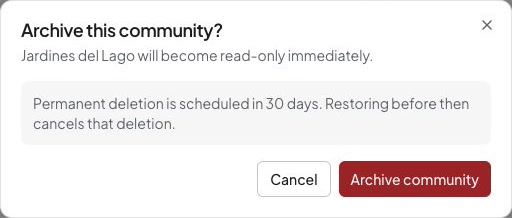
A community has a separate archive and retention lifecycle. Its available restoration, retention, and permanent-deletion options follow the community’s current state and account authority. Review the community settings and any displayed deadlines before confirming. Do not apply the ordinary record rules to an entire community, or assume canceling a subscription archives it.
This is an archive confirmation for review only. It was canceled; no community was archived or deleted.
Ask for help with recovery or permanent removal
If you deleted a record by mistake, contact support with its type, community, approximate date and the action taken. Self-service restoration is not guaranteed. Wait until the situation is understood before recreating it, especially when accounting or reserved identifiers are involved.
Contact support about permanent removal. Eligibility depends on your authority and the community’s retention requirements, including linked financial history. Review the displayed retention terms or ask support which requirements apply. Account and community retention rules can differ.
Compare the effect before confirming
| Your goal | Check first | Result to verify |
|---|---|---|
| Correct a title or description | Whether Edit is available | The same record shows the corrected text |
| Stop planned work | The work order’s status action | The saved state reflects cancellation without pretending payment was reversed |
| Remove an accidental duplicate | Exact record, permission and the deletion warning | The duplicate leaves ordinary views; the record you chose to keep remains |
| Organize a private inbox | Archive conversation | Your inbox organization changes; other people’s history is not erased |
| Correct recorded money | The feature’s cancellation, reversal or credit process | Check the resulting financial entries and balance separately |
For the duplicate request, first compare both references, comments, files and any linked bills. If one has substantive follow-up, keep it as the main record and explain the duplication through the community’s process. Do not delete either while the accounting or ownership is unclear.
Visibility is not destruction or restoration
An authorized delete can hide a record from normal lists, search, saved links, downloads and later actions. Comments and attachments can become unavailable with the deleted item, even if nobody removed them separately. A saved link does not preserve access to them.
A record hidden only for your account through a safety Hide action has a different purpose from deleting it for ordinary users. Follow that action’s own recovery route; do not promise that it restores a deleted record. Similarly, creating a new record with the old title is a new record, not restoration of the old reference, files or historical activity.
Check an uncertain result safely
After confirming removal, return to the source list and refresh once. Check the intended duplicate is absent and the record you intended to keep remains. A saved link that no longer opens is consistent with lost visibility, but does not prove permanent erasure. If a network error leaves the outcome unclear, inspect the current state before confirming removal again.
When contacting support, include only the details above and a reference if available. Do not send passwords, access tokens, private attachments or signed download links. Support must still check authority and retention; it cannot promise a refund or immediate permanent erasure merely because a record is hidden.